
How to Start Learning Embedded Systems
Starting your embedded systems journey in 2026 is easier than ever — yet the field is more demanding than before. Companies now want engineers who understand not only microcontrollers, but also IoT, AI on edge devices, firmware engineering, automotive standards like AUTOSAR, and embedded Linux.
Introduction — How to Start Learning Embedded Systems
If you’re wondering, “How do I start learning embedded systems in 2026?” — you’re in the right place. Embedded systems power everything around us today, from smartwatches and IoT devices to electric vehicles and industrial automation machines. But for beginners, the field often looks confusing, overly technical, and scattered across too many topics.
Let’s clear that up.
In the simplest words, an embedded system is a small computer built inside a larger electronic device to perform one specific task — like controlling a washing machine’s cycle, sensing temperature in a smart home device, or powering the dashboard in an EV.
Despite sounding complex, you can learn embedded systems step-by-step — even if you’re a beginner or from a non-electronics background.
So why do beginners feel confused?
Embedded systems combine multiple skills: electronics, programming, microcontrollers, real-time systems, tools, protocols, and more. Most guides either jump directly into coding or overwhelm you with jargon.
This guide is different.
Here, you’ll learn embedded systems in a clear, structured, beginner-friendly way — starting from basics, moving through essential skills, hands-on tools, practical projects, and ending with a career roadmap tailored for India’s growing embedded job market.
We’ve designed this as a 2026-ready roadmap, updated with the latest industry expectations, trending skills (IoT, Embedded Linux, AUTOSAR, TinyML), and modern learning tools you can start using right away.
Let’s begin your journey into one of the most in-demand tech fields of 2026.
What Are Embedded Systems?
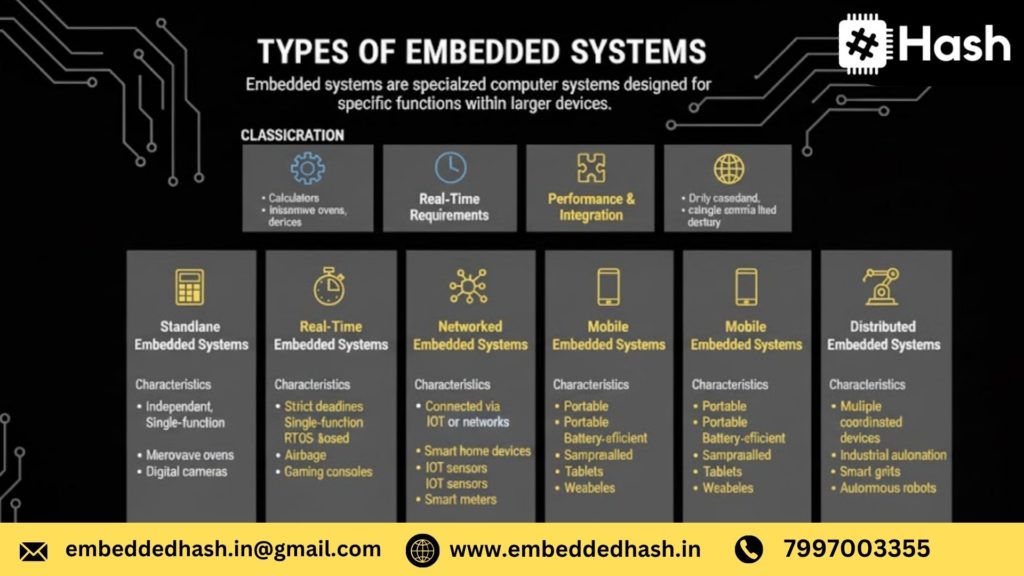
Embedded systems are everywhere — inside your car, your smartwatch, your mobile charger, even inside your washing machine. They quietly power the world around us. For beginners, understanding what an embedded system is forms the foundation of your entire learning journey.
Definition
An embedded system is a small, specialized computer designed to perform one dedicated function inside a larger electronic device.
Think of it as a brain built into a device to control, process, or monitor something.
In simple words:
An embedded system is a combination of hardware + software that works together to do a specific job.
Examples include reading temperature, controlling motors, playing audio, processing sensor data, connecting to WiFi, or managing safety functions in vehicles.
Real-World Examples (Cars, Appliances, IoT Devices)
Embedded systems are a part of nearly every modern product. Here are real examples:
In Cars (Automotive Embedded Systems)
- Airbag controllers
- Anti-lock braking systems (ABS)
- Engine control unit (ECU)
- Parking sensors
- ADAS (Advanced Driver Assistance Systems)
- Infotainment systems
Home Appliances
- Washing machine controller
- Microwave oven timer
- Smart TV motherboard
- Inverter and UPS systems
- Air conditioner temperature controller
IoT Devices (Most Popular in 2026)
- Smart home automation devices
- Fitness bands and smartwatches
- Smart meters (electricity/water)
- Surveillance cameras
- ESP32/NodeMCU-based IoT kits
Industrial & Medical
- PLC controllers
- Robotic arms
- ECG monitoring systems
- Industrial sensors
If a device can sense, compute, decide, and act — it likely uses an embedded system.
Embedded vs General-Purpose Systems
To understand embedded systems clearly, compare them with the computers we use daily.
General-Purpose System
A laptop, PC, or smartphone that can perform multiple tasks:
- Browsing
- Editing
- Gaming
- Social media
- Coding
They are flexible and multifunctional.
Embedded System
A dedicated computer built only to perform one main job:
- A microwave only heats food
- A washing machine only washes clothes
- A pacemaker only regulates heartbeat
Key Differences
Feature | Embedded System | General-Purpose System |
Purpose | Single/dedicated task | Multiple tasks |
Hardware | Microcontroller/ASIC | Processor/CPU |
Software | Firmware, RTOS | OS like Windows, Android |
Memory | Limited (KB–MB) | Large (GB) |
Speed | Real-time response | Not always real-time |
Cost | Low | High |
Embedded = specific + efficient.
General-purpose = flexible + powerful.
Why Embedded Systems Matter in 2026
Embedded systems are more important today than ever before. In 2026, they are powering innovations across India and worldwide.
1. Rise of IoT & Smart Devices
IoT devices like smart meters, home automation hubs, and wearable health trackers all depend on embedded systems.
2. EV & Automotive Industry Boom
Electric vehicles, ADAS, autonomous features, and safety systems rely heavily on embedded controllers.
Cities like Hyderabad, Bengaluru, Pune, Chennai are becoming global automotive tech hubs.
3. Embedded AI & Edge Computing Growing Fast
Devices now run AI models locally — from smart cameras to industrial sensors.
(TinyML, TensorFlow Lite Micro)
4. Demand for Skilled Engineers Is Exploding
Companies in India and abroad urgently need engineers skilled in:
- Embedded C
- RTOS
- Microcontrollers
- IoT
- Automotive (CAN, AUTOSAR)
- Embedded Linux
5. Embedded Systems Power Modern Life
They control:
- Airports
- Hospitals
- Payment machines
- Robots
- Factories
- Telecom networks
Without embedded systems, modern technology simply wouldn’t function.
Skills You Need Before Starting Embedded Systems
Before you step into embedded systems, you need a strong foundation in the core skills that help you understand both hardware and software. These skills are not optional — they form the backbone of everything you will build as an embedded engineer.
Below is a quick comparison table showing what each skill covers and why it’s important in 2026:
Essential Skills for Embedded Systems Beginners (2026)
Skill Category | What You Learn | Why It Matters (Industry 2026) |
Basic Electronics | Voltage, current, resistance, GPIO, sensors, actuators | To understand how hardware behaves and avoid damaging circuits |
C Programming | Pointers, memory, bitwise operations, interrupts | Core skill for firmware jobs and microcontroller programming |
C++ (Optional) | OOP, modular coding | Useful for embedded Linux, robotics, and scalable firmware |
Hardware–Software Interaction | Registers, datasheets, protocols (I2C, SPI, UART) | Helps you design real systems, not just run Arduino code |
Mathematical Thinking | Logic, timers, PWM, binary/hex math | Needed to configure peripherals and write optimized code |
Debugging & Problem-Solving | Multimeter usage, logic analyzers, debugging tools | Helps you fix hardware and firmware-level issues efficiently |
Basic Electronics (Voltage, Current, GPIO, Sensors)
Embedded systems begin with understanding electronics, even at a fundamental level. You don’t need to become an electrical engineer — but you DO need to understand how circuits behave.
What You Must Know:
- What are voltage, current, and resistance
- Difference between digital and analog signals
- Using a breadboard, multimeter, and basic components
- How sensors (temperature, motion, light) generate signals
- How actuators (motors, relays, buzzers) respond to signals
- How GPIO pins work and why they matter
Why this matters in 2026:
Companies today expect beginners to understand how to connect a sensor, read its datasheet, and ensure the circuit is safe — not just upload Arduino code.
Programming Foundations (C Mandatory, C++ Optional)
Programming is the brain of an embedded system — and C is the language that powers 90% of microcontrollers.
Why C Is Mandatory:
- It gives you low-level control
- Used for register manipulation
- Required for firmware development
- Every major microcontroller vendor uses C
What You Should Master:
- Datatypes & pointers
- Arrays & structures
- Functions & memory usage
- Bitwise operations
- Interrupt handling
- Timers and loops
- Embedded coding best practices
C++ — Optional but Useful
C++ becomes relevant when working with:
- Embedded Linux
- Robotics
- IoT gateways
- Large firmware projects requiring modular coding
2026 Insight:
Recruiters in India prefer candidates with clean, optimized C code and basic C++ knowledge for advanced platforms.
Hardware–Software Interaction
This is the skill that truly makes you an embedded engineer — the ability to make hardware and software work together.
Key Things You Will Learn:
- How microcontrollers communicate (UART, I2C, SPI)
- How to read datasheets and reference manuals
- Understanding interrupts, timers, ADC, PWM
- Writing register-level code
- Reading/writing to memory and peripherals
- Configuring sensors and modules
Real-world example:
When connecting a temperature sensor (like LM35), you need to
configure ADC
read analog values
convert them to temperature
display or transmit the value
2026 Industry Demand:
Companies expect engineers who understand what is happening inside the microcontroller — not just API-based coding.
Mathematical Thinking (Logic, Timers, Bitwise Operations)
Math for embedded systems is not complicated — it’s logical.
You need:
1. Logical Thinking
- Boolean logic (AND, OR, NOT)
- Decision-making flow
- State machine thinking
2. Timers & Delays
- Calculating timer counts
- Understanding clock frequency
- Converting time into cycles
Example:
If your microcontroller runs at 16 MHz and you need a 1 ms delay,
you should know how to calculate timer overflow values.
3. Bitwise Operations
- Bit shifting
- Bit masking
- Setting, clearing, toggling bits
These are used daily in register-level programming.
4. Binary & Hex Math
- Reading binary data
- Interpreting registers
- Understanding memory addresses
2026 Perspective:
This skill helps you configure peripherals accurately — one wrong bit can break the whole system.
How to Start Learning Embedded Systems
Starting your embedded systems journey in 2026 requires a smart, structured approach. The field has evolved — companies now expect stronger fundamentals in microcontrollers, firmware, RTOS, communication protocols, and even IoT/cloud connectivity.
This roadmap breaks down the entire learning process into simple, practical, and industry-ready steps, perfect for beginners, students, and job seekers in India.
Step 1 — Learn Microcontroller Architecture
Your embedded learning starts with understanding what exactly a microcontroller is and how it functions.
What is an MCU?
A Microcontroller Unit (MCU) is a compact, self-contained computer built into electronic devices to control specific operations.
It typically includes:
- CPU (brain)
- RAM + Flash memory
- Timers
- I/O Ports
- Communication interfaces (UART, SPI, I2C)
Think of an MCU as a “mini computer” responsible for controlling a single application inside a device.
Registers, GPIO, Timers, Interrupts, ADC — Explained Simply
To build real firmware, you must understand these core blocks:
1. Registers (Most Important for Embedded C)
Registers are small memory locations inside the MCU that control hardware.
Example: Setting a bit in a GPIO register can turn an LED ON.
2. GPIO (General Purpose Input/Output)
Used for connecting sensors, switches, relays, LEDs, motors, etc.
- Input → Read data
- Output → Send signals
3. Timers
Let the microcontroller measure time, control delays, generate PWM signals (e.g., dimming lights or controlling motors).
4. Interrupts
These allow the CPU to respond instantly to external or internal events, like:
- Button press
- Sensor trigger
- Timer overflow
5. ADC (Analog-to-Digital Converter)
Converts analog signals → digital values.
Used in temperature, gas, humidity, light sensors, etc.
Step 2 — Choose Your First Beginner-Friendly Board
Choosing the right development board sets the foundation for your journey. Here are the best options for 2026:
1. ESP32 — Best for IoT & Wireless Projects
- Built-in WiFi + Bluetooth
- Dual-core CPU
- Works with Arduino, MicroPython, C/C++
Perfect for IoT, smart home, automation projects.
2. Arduino UNO — Best for Absolute Beginners
- Easiest learning curve
- Huge beginner community
- Tons of tutorials available
Ideal for students starting electronics + coding from scratch.
3. Raspberry Pi Pico (RP2040) — Modern + Very Low Cost
- Dual Cortex-M0+
- Supports C/C++ and MicroPython
- Super affordable
Perfect for learners who want powerful hardware at a budget price.
4. STM32 Nucleo — For Professional Learning
- ARM Cortex-M series
- Used widely in industry
- Supports FreeRTOS, advanced peripherals
Best choice if your goal is core embedded jobs (Automotive, Medical, Industrial).
Step 3 — Learn Embedded C (Mandatory Skill)
Embedded C is the heart of every microcontroller, and it’s the most demanded skill in 2026.
Why C Dominates Embedded
- Direct access to hardware registers
- Lightweight and fast
- Predictable memory usage
- Works in real-time applications
- Industry-standard language for firmware
Nearly 90% of companies in India test Embedded C in interviews.
Recommended Learning Platforms
- NPTEL
- FreeCodeCamp (C basics)
- Embedded Artistry
- Udemy (Embedded C + STM32 courses)
- YouTube channels like:
- Phil’s Lab
- ShawnHymel
- MicrocontrollersAndMore
- Phil’s Lab
Step 4 — Set Up Your Development Toolchain
After choosing your board, the next step is setting up tools used by real embedded engineers.
IDEs (Integrated Development Environments)
- VS Code + PlatformIO → Best universal option
- STM32CubeIDE → For STM32 boards
- MPLAB X IDE → For PIC microcontrollers
- Keil uVision → Industry standard for ARM Cortex
Debuggers (Essential for real development)
- ST-Link → For STM32
- J-Link → Professional, fast
- Black Magic Probe → Open-source debugging
Compilers You Should Know
- GCC (GNU Arm Toolchain)
- Clang/LLVM
These convert your C code → machine code for the MCU.
Step 5 — Learn Communication Protocols (Deep Dive)
Communication protocols allow the MCU to interact with sensors, displays, modules, and other devices.
These are a MUST-KNOW for interviews.
1. UART (Serial Communication)
Used for debugging, GPS modules, serial monitors.
Simple: TX ↔ RX communication.
2. I2C (Two-Wire Communication)
Used for sensors like MPU6050, OLED displays.
- SDA → data
- SCL → clock
Allows multiple devices on the same bus.
3. SPI (High-Speed Communication)
Used for displays, high-speed sensors, SD cards.
Faster than I2C.
4. CAN (Automotive Protocol)
Used in Electric Vehicles, ADAS, and AUTOSAR systems.
- Highly reliable
- Designed for noise-heavy environments
If you want automotive jobs, CAN is non-negotiable.
Simple Use Cases (With Explanation)
- UART → Print data to PC console
- I2C → Read accelerometer values
- SPI → Display images on an LCD
- CAN → Exchange data between two ECUs
Step 6 — Learn Real-Time Concepts & RTOS
Once you’re comfortable with C and MCUs, move into real-time systems.
What is Real-Time?
A real-time system responds to events within strict timing constraints.
Examples:
- Airbag system
- Motor control
- Industrial automation
Introduction to FreeRTOS
FreeRTOS is the most widely used open-source RTOS in 2026.
You’ll learn:
- Tasks
- Queues
- Mutexes
- Semaphores
- Schedulers
Important RTOS Concepts
Tasks
Small programs running independently inside the MCU.
Queues
Used for communicating between tasks safely.
Scheduling
RTOS decides which task to run at what time.
Delay / Sleep
Let tasks wait without blocking the CPU.
RTOS knowledge immediately boosts employability — especially for automotive & IoT companies.
Beginner-Friendly Projects
The best way to master embedded systems is by building, not just reading. Here are beginner to intermediate-level projects that gradually improve your skills — starting from no hardware simulations to real-world embedded mini-projects.
Level 1 — No Hardware Needed (Simulations)
If you’re just starting and don’t have a microcontroller yet, these simulation-based projects help you learn coding, debugging, and circuit logic without spending money.
1. LED Blink in Tinkercad
This is the classic “Hello World” of embedded systems.
What you learn:
- Basics of digital output
- Arduino code structure (setup + loop)
- Pin configuration
- Timing using delay()
Why it matters:
Almost every embedded system controls LEDs, indicators, and signals. This project builds your foundation perfectly.
2. Sensor Simulation
Use Tinkercad or Proteus to simulate:
- Temperature sensor
- LDR (light sensor)
- Potentiometer
- Ultrasonic sensor
What you learn:
- Analog vs digital input
- ADC (Analog-to-Digital Conversion)
- Calibrating sensor values
Simulating sensors helps you understand how real hardware behaves — without buying components yet.
3. Serial Monitor Simulation
Practice sending data from the microcontroller to your computer.
What you learn:
- UART basics
- Debugging through print statements
- How to display sensor values
- Simulating communication loops
This skill becomes extremely important when you work on real hardware later.
Level 2 — Real Hardware Projects
Once you’re comfortable with simulations, start building small real-world projects using Arduino, ESP32, or STM32. These will build your confidence and help you understand actual electronics.
1. LM35 Temperature Monitor
Read temperature values and display them through the serial monitor or LCD.
What you learn:
- Interfacing analog sensors
- ADC reading and conversion formulas
- Basic signal conditioning
This is often one of the first sensor-based projects students build.
2. ESP32 IoT Home Automation
Build a simple system to control lights or appliances through WiFi.
What you learn:
- IoT basics (WiFi, HTTP/MQTT)
- GPIO control via internet
- Using mobile apps like Blynk or web dashboards
- ESP32 firmware coding
A highly relevant project for 2026, especially with the boom in smart home devices.
3. Ultrasonic Distance Meter
Measure distance using an ultrasonic sensor and display it on an LCD/serial monitor.
What you learn:
- Timing, delays, and sensor triggering
- Calculating distance using speed of sound
- Handling real-time sensor noise
Nearly every robotics or automation system uses this type of sensor.
4. LED + Push-Button Debouncing
Build a stable input control system using a push-button and LED.
What you learn:
- Mechanical switch bounce
- Software debouncing using timers
- Clean signal processing
- Interrupt-based inputs (optional)
Debouncing is a fundamental concept every embedded developer must understand.
Level 3 — Mini Real-Time Projects
In this stage, you move from basic hardware to timing, events, storage, and multitasking — real-world firmware development.
1. SD Card Data Logging
Record sensor values to an SD card at fixed intervals.
What you learn:
- File handling on embedded systems
- SPI protocol
- Real-time data sampling
- Using timestamps
This is widely used in industrial monitoring, IoT, and analytics.
2. PIR Motion Detector
Build a motion-detecting alert or lighting system.
What you learn:
- Interfacing PIR sensors
- Interrupts and event handling
- Power-saving techniques
- Real-life automation logic
This project is a great introduction to security and home automation applications.
3. Simple RTOS Task Scheduler
Create a mini real-time operating system with two or three tasks.
What you learn:
- Task switching
- Timing and delays
- Cooperative/round-robin scheduling
- Understanding how FreeRTOS works
This project transitions you from “Arduino-level coding” to real embedded firmware engineering.
Learn Embedded Systems With & Without Hardware
Many beginners believe they must buy development boards immediately. But in reality, you can start learning embedded systems even without hardware, using free online simulators. Once you build confidence, you can slowly shift to budget-friendly boards and then to advanced microcontrollers.
This step-by-step approach is perfect for students, beginners, and anyone learning from home in India.
Without Hardware — Simulators (Tinkercad, Wokwi, Proteus)
If you’re not ready to invest in hardware yet, simulators are the best place to begin. They let you practice circuits, microcontroller programs, and logic without buying any components.
Here are the top simulators for 2026:
1. Tinkercad Circuits
Beginner-friendly and ideal for Arduino practice.
- Drag-and-drop interface
- Supports LED, sensors, servos, motors
- Great for absolute beginners
- Browser-based, no installation
Best for: Students starting with Arduino basics.
2. Wokwi
The most popular modern simulator for embedded & IoT learners.
- Simulates Arduino, ESP32, Raspberry Pi Pico
- Real-time serial monitor
- Supports WiFi, sensors, OLEDs
- Extremely accurate ESP32 simulation
Best for: IoT beginners and ESP32 learners.
3. Proteus (Professional Simulation Tool)
Used by B.Tech/M.Tech students and professionals.
- Accurate microcontroller simulation
- Supports AVR, ARM (STM32), PIC
- Ideal for PCB and circuit-level testing
- Industry-grade
Best for: Advanced learners preparing for embedded jobs.
Why simulators help:
You can understand logic, circuits, and programming concepts before touching real hardware — saving money and time.
Budget Hardware Options (₹500–₹1,000)
When you’re ready to try real hardware, you don’t need expensive development kits. India offers several low-cost options under ₹1,000 that are perfect for beginners.
1. Arduino Uno Clone – ₹350 to ₹550
Great for learning GPIO, sensors, motors, and basic embedded C.
2. ESP8266 (NodeMCU) – ₹300 to ₹450
Perfect for IoT beginners — supports WiFi and cloud connectivity.
3. ESP32 Dev Board – ₹650 to ₹900
More powerful: WiFi, Bluetooth, dual-core, sensors, touch pins.
4. Sensors Starter Kit – ₹400 to ₹700
Includes:
- IR sensor
- Ultrasonic sensor
- DHT11
- LDR
- Push buttons
- Breadboard + jumper wires
Where to buy in India:
- Robu.in
- Amazon India
- Thingbits
- ElectronicsComp.in
These low-cost boards are more than enough to practice 60–70% of embedded concepts.
When to Shift to Real Hardware
You should move from simulators to real boards when you:
- Understand basic input/output (LEDs, sensors, buttons)
- Can write simple Arduino or ESP32 programs confidently
- Want to learn real-world debugging
- Need to work on timing, interrupts, communication protocols
- Want to showcase portfolio projects for interviews
Important:
Professional embedded engineering is impossible with simulators alone. Real hardware teaches you:
- Noise, voltage fluctuations
- Sensor inaccuracies
- Debouncing
- Interrupt timing
- Memory limitations
- Power issues
These challenges are the real foundation of embedded systems.
Ideal path:
- Start with simulators
- Move to Arduino/ESP boards
- Then graduate to STM32, PIC, or embedded Linux boards
Debugging in Embedded Systems (Unique SEO Advantage)
Debugging is one of the most crucial skills in embedded systems development. Unlike software debugging on a laptop, embedded debugging involves working with hardware, peripherals, memory, timing, interrupts, and real-time behavior.
Mastering debugging gives you a unique SEO advantage because very few blogs explain it deeply — yet companies expect engineers to know it.
Debugging helps you:
- Identify where your firmware is failing
- Understand hardware-software interactions
- Fix timing issues
- Validate communication protocols
- Improve system performance
Below is the complete beginner-friendly guide to embedded debugging.
What Is Debugging in Embedded Systems?
Debugging in embedded systems means finding, analyzing, and correcting errors in firmware or hardware to ensure the system works as expected.
Unlike normal software debugging, embedded debugging has constraints like:
- Limited memory
- Real-time execution
- External sensors & hardware
- Interrupt-driven behavior
- Peripheral configurations
You don’t just debug code — you debug hardware + software + timing together.
Example:
An LED not blinking is not just a “code issue.”
It might be:
- Wrong GPIO configuration
- Faulty board connection
- Incorrect clock setup
- Timer misconfiguration
- Power supply issues
This makes embedded debugging a skill of problem-solving, electronics understanding, and systematic code testing.
SWD, JTAG & UART Debugging (Beginner-Friendly Explanation)
Embedded debugging tools help you see what’s happening inside a microcontroller in real time.
SWD (Serial Wire Debug) – Modern & Lightweight
SWD is a 2-pin interface widely used in ARM Cortex microcontrollers.
It lets you:
- Set breakpoints
- Step through code
- Watch variables live
- Flash firmware
- Halt/resume the microcontroller
Why it’s important:
Most STM32, NXP, Nordic, and ESP chips use SWD.
JTAG (Joint Test Action Group) – Advanced Multi-Pin Debugging
JTAG is a 4-pin (sometimes 5-pin) debugging interface.
It is used for:
- Deep hardware debugging
- Boundary scan testing
- Debugging multiple chips in a chain (DSP + MCU + FPGA)
- Checking board-level connections
Companies use JTAG heavily for industrial and automotive systems.
UART Debugging – Easiest for Beginners (Print Debugging)
UART debugging uses serial communication to print log messages to a PC.
Example:
printf(“Sensor value: %d\n”, value);
Beginners use UART for:
- Checking variable values
- Testing logic flow
- Understanding program behavior
Tip for 2026:
Use lightweight logging libraries to avoid timing distortion in real-time systems.
Logic Analyzer Basics (Must-Learn Debugging Tool)
A logic analyzer captures digital signals (like I2C, SPI, UART) and shows them as waveforms.
It helps you:
- Identify protocol errors
- Measure signal timing
- Validate communication between modules
- Debug inconsistent sensor values
- Check interrupt frequency
Example use cases:
- I2C ACK/NACK issues
- Wrong SPI mode (CPOL/CPHA)
- PWM generation problems
Most beginners skip logic analyzers — but using one will instantly level up your debugging skills.
Most Common Beginner Debugging Mistakes (Avoid These)
Beginners often struggle because debugging is not taught well in colleges.
Here are the most common mistakes:
1. Not Checking Power Supply First
80% of hardware issues are due to:
- Inconsistent voltage
- Insufficient current
- Loose cables
- Faulty USB cable
2. Misconfigured GPIO Pins
Wrong pin mode (input/output/alternate function) causes:
- No LED blink
- No sensor data
- No PWM output
3. Ignoring Clock Configuration
Microcontrollers depend heavily on the system clock.
A wrong clock setup breaks:
- Timers
- UART baud rate
- ADC sampling
- PWM frequency
4. Not Reading the Datasheet & Reference Manual
Every microcontroller behaves differently.
Skipping documentation leads to wrong assumptions.
5. Using printf() Everywhere
Print debugging slows the system and hides timing bugs.
Use it wisely.
6. No Structured Debugging Approach
Beginners often “randomly change code” instead of following a process:
Correct approach:
- Reproduce the issue
- Isolate the module
- Test hardware
- Validate register settings
- Analyze communication
- Test with minimal code
7. Skipping Oscilloscope/Logic Analyzer Testing
Trusting only code logs leads to incomplete debugging.
Best Learning Resources for Embedded Systems
If you’re starting your embedded journey in 2026, learning from the right resources can save you months of confusion. Below is a curated list of the best books, YouTube channels, courses, GitHub repos, and communities trusted by industry engineers.
Books (Beginner to Advanced)
These books offer strong foundational understanding for electronics, microcontrollers, and firmware development.
1. “Embedded Systems: A Beginner’s Guide to ARM® Cortex™-M Microcontrollers” by Jonathan Valvano
Best for learning ARM architecture, registers, interrupts, timers, and real-time concepts.
2. “Embedded C” – Michael J. Pont
Perfect for beginners who want structured embedded C programming techniques.
3. “The C Programming Language” – Kernighan & Ritchie (K&R)
Still the gold standard for learning C — a must-read for firmware developers.
4. “Make: Electronics” – Charles Platt
Great for understanding electronics basics through experiments.
5.“Real-Time Concepts for Embedded Systems” by Qing Li – A Practical Guide to Building Time-Critical Embedded Applications
Essential for understanding RTOS, multithreading, and real-time behavior.
YouTube Channels (Free, Beginner-Friendly)
These channels are ideal for step-by-step learning with visuals and hands-on demos.
1. Neso Academy
Best for C programming, microcontrollers, and embedded basics.
2. FreeRTOS Channel
Official tutorials on tasks, queues, semaphores, scheduling, and real-time programming.
3. MicrocontrollersAndMore
Practical tutorials for Arduino, ESP32, STM32 projects.
4. Phil’s Lab
High-quality content on PCB design, embedded systems, STM32, and signal processing.
5. ElectroBOOM & GreatScott
Fun + educational content to understand electronics deeply.
Free & Paid Courses (India + Global, 2026 Updated)
Free Courses
- Coursera – Introduction to Embedded Systems
- NPTEL – Microcontrollers and Applications
- Udemy Free Courses – Embedded C basics, STM32 basics
- FreeCodeCamp – IoT and Python fundamentals
Paid / Premium Courses
(Most trusted for placement-focused embedded learning)
- Embedded Hash (Hyderabad) – Embedded Systems, IoT, Automotive, Embedded Linux
- Coursera Specialization – Embedded Software Essentials
- Udemy – STM32, FreeRTOS, Linux driver development
- ARM Education – Cortex-M and embedded C certification
- Texas Instruments Academy
GitHub Repositories (Hands-On Learning)
These repos help you practice real embedded firmware code.
1. STM32Cube Repository
Official code examples for every STM32 microcontroller series.
2. FreeRTOS Kernel
Learn real-time embedded programming from real kernels.
3. ESP-IDF (ESP32 Framework)
IoT-ready code for WiFi, Bluetooth, MQTT, sensors, GPIO, timers.
4. Zephyr RTOS
Modern, industry-grade RTOS used in IoT and automotive systems.
5. Arduino Core
A great starting point for beginners learning microcontroller code structure.
Forums & Communities (For Doubts, Debugging, Career Help)
Community support accelerates your learning curve.
1. StackOverflow – Embedded Tag
Quick technical answers from experienced engineers.
2. EEVBlog Forum
Deep discussions on hardware design, PCBs, power circuits.
3. Reddit Communities
r/embedded
r/embeddedlinux
r/robotics
r/iot
4. GitHub Discussions
Active discussions under RTOS, ARM, ESP32, and Linux repos.
5. Embedded System Groups on LinkedIn
Great for job trends, mentorship, and networking.
Conclusion —
Learning embedded systems may feel overwhelming when you’re just starting, but as you’ve seen in this guide, the path becomes clear once you follow a structured roadmap. Whether your goal is to build IoT devices, work in automotive electronics, develop embedded Linux systems, or enter the booming EV industry, the foundation begins with strong basics and consistent hands-on practice.
Quick Recap of Your Embedded Learning Roadmap
Here’s a simple summary of the steps you should follow:
- Understand what embedded systems are and where they’re used.
- Build electronics fundamentals — voltage, current, sensors, actuators, circuits.
- Master C programming, especially pointers, memory, and bitwise operations.
- Start with microcontrollers like Arduino/ESP32, then move to STM32 (ARM).
- Learn internal peripherals — GPIO, timers, PWM, interrupts, ADC, UART, SPI, I2C.
- Get familiar with tools — Keil, STM32CubeIDE, Git, debugging tools, logic analyzers.
- Move to advanced areas — RTOS, IoT, Embedded Linux, AUTOSAR, Edge AI/TinyML.
- Build real projects to strengthen your portfolio and confidence.
- Contribute to open-source and publish your work on GitHub.
- Focus on interview preparation based on real industry expectations in India.
This roadmap is designed to take you from absolute beginner to industry-ready in a structured, realistic, and effective way.

Frequently Asked Questions
Not really — it only feels difficult in the beginning because embedded systems combine electronics + programming + hardware understanding.
If you learn step-by-step (C programming → microcontrollers → projects), it becomes very simple and practical.
Most students crack it within a few months of consistent practice.
On average:
- 3–4 months → Basics (C programming, GPIO, sensors)
- 6–8 months → Job-ready skills (RTOS, debugging, protocols)
- 12 months → Advanced areas (Embedded Linux, IoT, AUTOSAR, AI on edge)
Your learning speed depends on how many projects you build.
Yes, absolutely.
Many Computer Science and IT students learn embedded from zero.
You only need basic electronic concepts like:- Voltage, current
- Sensors
- Digital vs analog signals
These can be learned online in 1–2 weeks.
- Voltage, current
For beginners in 2025:
- Arduino Uno → Best for absolute beginners
- ESP32 → Best for IoT and WiFi projects
- STM32 (Blue Pill) → Best for industry-level register programming
Start simple with Arduino → move to ESP32 or ARM boards.
Yes — more than ever.
Demand is booming in India because of:
- Electric vehicles (EV)
- IoT and Industry 4.0
- Smart devices and wearables
- Automotive electronics (ADAS, AUTOSAR)
- Semiconductor growth (Make in India)
Embedded engineering is one of the top 5 tech jobs in India in 2026.
C is mandatory for all embedded jobs.
Python is optional and mainly useful for:- Testing scripts
- Automation
- Embedded Linux
- AI/ML on edge devices
Start with C, then learn Python later if needed.
- Testing scripts
Core skills include:
- Embedded C programming
- Microcontrollers (ARM, ESP32, Arduino)
- Electronics basics
- Communication protocols (UART, SPI, I2C, CAN)
- RTOS fundamentals
- Debugging tools (JTAG, logic analyzer)
- Git/GitHub
- Optional: Embedded Linux, IoT, AUTOSAR
- Embedded C programming
Only very basic math like:
- Binary, decimal, hex
- Timing calculations
- Frequency, PWM, ADC formulas
You do not need high-level mathematics.
Even students weak in math do very well in embedded.
Yes, it’s one of the fastest-growing and highest-salary careers today.
Industries hiring in India:
- Automotive
- IoT and smart devices
- Semiconductor companies
- Defence and aerospace
- Consumer electronics
Cities with the best opportunities: Bangalore, Hyderabad, Pune, Chennai, Noida.
Yes. In fact, Mechanical, Electrical, EEE, and ECE students have a big advantage because they already understand sensors, machines, and circuits.
Mechanical graduates are moving into:
- Automotive embedded
- EV systems
- Robotics
- Industrial automation
You only need to learn programming and microcontrollers.
Average salary ranges (India – 2025):
- Fresher: ₹3.5L – ₹6L
- 1–3 years experience: ₹6L – ₹12L
- 5+ years experience: ₹12L – ₹20L
- Automotive/AUTOSAR experts: ₹18L – ₹30L
- Embedded Linux/TinyML engineers: ₹15L – ₹32L
Top-paying cities: Bangalore, Hyderabad, Pune.
If you want to Learn more About Embedded Systems, join us at Embedded Hash for Demo Enroll Now


 embeddedhash.in@gmail.com