
Bootloader vs Firmware : What Is the Difference?
- Bootloader vs Firmware is an important concept in embedded systems. Both are software stored in a device, but they have different roles.
- Firmware runs the device’s main functions, while a bootloader prepares, verifies, updates, and starts the firmware.
- For example, when a microcontroller powers ON, the bootloader may check for a valid firmware or update, then start the main application.
- Understanding this difference is useful for learning microcontrollers, Embedded C, STM32, Embedded Linux, IoT, automotive systems, and firmware development.
Table of Contents
ToggleBootloader vs Firmware
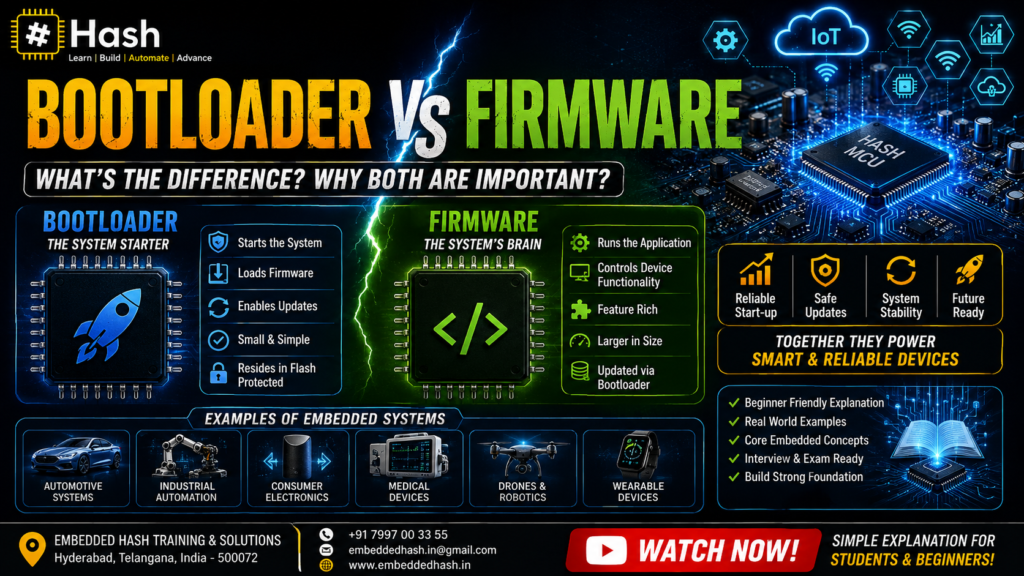
A bootloader is a small program responsible for starting or updating the main application on an embedded device.
Firmware is the software programmed into an embedded device that controls its hardware and performs the device’s intended functions.
The bootloader can be considered the starter and updater, while firmware is the main software that makes the product work.
For example, in a smart sensor:
- The bootloader can check for a new firmware update.
- It can receive the new firmware through UART, USB, CAN, SPI, I2C, Ethernet, or another supported interface.
- It can erase and program the appropriate Flash memory.
- It can verify the new firmware.
- It can transfer control to the application firmware.
- The firmware then performs the actual sensor-related tasks.
Microcontroller manufacturers commonly use this type of architecture to support firmware updates without requiring an external programmer every time.
What Is Firmware?
Firmware is software designed to control a specific piece of hardware.
Unlike software such as a web browser or word processor, firmware is closely connected to the physical hardware.
A microcontroller needs software that tells it what to do.
For example, firmware can tell a microcontroller to:
- Read a temperature sensor.
- Turn an LED ON or OFF.
- Receive data through UART.
- Send data through CAN.
- Control a motor.
- Read buttons.
- Communicate through SPI or I2C.
- Control an LCD display.
- Monitor battery voltage.
- Run tasks using an RTOS.
- Process data from connected sensors.
Firmware is commonly stored in non-volatile memory such as Flash so that it remains available after the device is powered OFF.
Simple Example of Firmware
Suppose you build a temperature-monitoring device.
The hardware contains:
- Microcontroller
- Temperature sensor
- Display
- Power supply
The firmware could contain the logic:
- Start the microcontroller.
- Initialize the GPIO pins.
- Initialize the sensor.
- Read temperature data.
- Process the data.
- Display the temperature.
- Repeat the process.
That program is part of the device’s firmware.
Without suitable firmware, the hardware may not perform its intended function.
What Is a Bootloader?
- A bootloader is a program that runs before the main application firmware and helps load, verify, update, or start that application.
- The exact behavior depends on the microcontroller and bootloader design.
- A bootloader can be stored in a protected or reserved area of memory. The application firmware normally occupies another area.
- One important purpose of a bootloader is firmware updating.
- For example, instead of connecting a programmer to every device in the field, a product can use a bootloader to receive a new application image through a communication interface.
- Microchip describes bootloaders as programs used to upgrade firmware without an external programmer or debugger, while also noting that bootloaders can validate firmware integrity and authenticity.
What Does a Bootloader Do?
A bootloader can perform several important tasks.
1. Starts After Reset
In many embedded designs, the bootloader is designed to execute during the early boot process.
It determines what should happen next.
The decision may depend on factors such as:
- Is valid application firmware present?
- Has the user requested an update?
- Is the device in recovery mode?
- Is a new firmware image available?
- Is the application image valid?
The exact reset and boot sequence depends on the microcontroller architecture.
For example, STM32 devices can have system bootloader functionality stored in system memory, while a product can also use a custom bootloader stored in user Flash
2. Checks the Application
A bootloader can check whether the application firmware is available and valid before starting it.
A simple design may check whether an expected application image exists.
A more secure design may verify:
- Checksum
- CRC
- Hash
- Digital signature
- Firmware authenticity
- Firmware integrity
This prevents corrupted or unauthorized firmware from being executed.
ST’s secure firmware update material specifically covers firmware confidentiality, integrity, authenticity, and secure bootloader design
3. Updates Firmware
One of the most important uses of a bootloader is updating application firmware.
A device can receive a new firmware image through a supported communication interface.
Depending on the product, this could involve:
- UART
- USB
- CAN
- CAN FD
- SPI
- I2C
- Ethernet
- Bluetooth
- Wi-Fi
Microchip bootloader implementations support different interfaces depending on the device and application.
4. Programs Flash Memory
After receiving a firmware image, the bootloader may:
- Check the received data.
- Erase the required application Flash area.
- Write the new firmware.
- Verify the programmed data.
- Mark the firmware as valid.
- Start the new application.
The exact implementation depends on the MCU’s Flash architecture and bootloader design
5. Jumps to the Application
After completing its work, the bootloader can transfer execution to the main application.
This is commonly described as jumping to the application.
The bootloader and application must be designed with compatible memory locations, interrupt handling, startup code, and linker configuration.
What Does Firmware Do?
Firmware performs the actual job of the embedded product.
For example, consider a washing machine.
The firmware can control:
- Motor operation
- Water level
- Temperature
- Buttons
- Display
- Door lock
- Timers
- Sensors
- Error detection
The bootloader is not normally responsible for controlling the washing cycle.
Instead, it helps prepare, update, validate, and start the software that controls the washing machine.
That software is the application firmware.
Bootloader vs Firmware: Main Difference
The easiest way to understand the difference is to look at their responsibilities.
Feature
Bootloader
Firmware
Main purpose
Start, update, verify, or load application
Operate the embedded device
Runs
Usually during early boot/update mode
Usually after bootloader
Size
Usually smaller
Usually larger
Hardware control
Limited and purpose-specific
Main hardware control
Firmware update
Often responsible for it
May request or support the update
Flash programming
Often performs it
Usually runs from programmed memory
Communication
May communicate for updates
Communicates as part of product operation
Application logic
Usually limited
Contains the main product logic
Security checks
Can verify firmware
Provides application functionality
Example
Device update program
Motor-control application
The important point is that bootloader and firmware are not necessarily competing types of software.
A bootloader can itself be considered firmware in the broad sense because it is software stored in an embedded device. However, in everyday embedded engineering discussions, “firmware” often refers specifically to the main application firmware, while “bootloader” refers to the software responsible for booting or updating that application.
Is a Bootloader Firmware?
Yes, a bootloader can be considered firmware because it is software stored on and executed by an embedded device.
However, engineers often distinguish between:
- Bootloader firmware
- Application firmware
This distinction makes discussions about memory layout, updates, debugging, and software architecture easier.
For example:
Bootloader → Application Firmware
The bootloader may occupy one Flash region, while the application firmware occupies another.
Microchip documentation describes architectures where bootloader and user application firmware coexist in different memory areas.
Bootloader vs Application Firmware
The term application firmware is useful because it removes confusion.
The application firmware is the software that performs the product’s main function.
The bootloader prepares the device to run that application.
For example, in an automotive ECU:
Bootloader
May handle firmware download, image validation, Flash programming, and application startup.
Application firmware
May handle vehicle functions such as sensor processing, communication, control algorithms, diagnostics, and other ECU-specific operations.
This separation makes firmware updates and product maintenance easier to manage.
Bootloader and Firmware Memory Layout
A typical microcontroller Flash memory can be divided into different regions.
For example:
Bootloader region
Contains the bootloader code.
Application region
Contains the main firmware.
Configuration/data region
May contain calibration values, device settings, metadata, or update information.
The exact addresses and sizes depend on the MCU, linker script, bootloader design, and application requirements.
A simplified conceptual arrangement is:
Flash Memory
- Bootloader
- Application Firmware
- Configuration/Data
The bootloader and application should not accidentally overwrite each other’s memory.
This is why the linker script is important in bootloader-based embedded projects.
Why Is the Linker Script Important?
When a project contains both a bootloader and application, the application often cannot simply be linked at the normal Flash starting address.
The linker configuration may need to place the application at a different address.
For example, conceptually:
- Bootloader starts at one Flash address.
- Application starts at a later Flash address.
- Application vectors and sections are linked accordingly.
The exact addresses should always come from the target MCU’s memory map and project design.
A wrong memory configuration can cause problems such as:
- Application not starting.
- Interrupts not working correctly.
- Bootloader being overwritten.
- Hard faults.
- Invalid vector table location.
- Firmware update failure.
This is one reason bootloader development requires a good understanding of microcontroller memory, startup code, interrupts, and linker scripts.
How Does a Bootloader Update Firmware?
- A firmware update can be divided into several logical stages.
- First, the bootloader enters an update mode.
- Next, it communicates with a host device or update source.
- The new firmware image is transferred.
- The bootloader checks the received image.
- If the image passes the required validation, the bootloader programs the application memory.
- The programmed image can then be verified.
- Finally, the bootloader transfers control to the new application.
- This general architecture is used for wired and wireless firmware updates. Microchip documents bootloader-based updates over interfaces such as UART and CAN, while OTA bootloaders can support remote firmware updates over wireless connectivity.
What Is a Firmware Update?
A firmware update replaces or modifies the existing device firmware with a newer version.
Manufacturers release firmware updates for reasons such as:
- Fixing bugs
- Improving stability
- Adding features
- Improving performance
- Fixing security vulnerabilities
- Supporting new hardware
- Improving communication
- Correcting product behavior
For example, version 1.0 of a device may have a software problem.
A manufacturer can release version 1.1.
The bootloader can help install version 1.1 into the device.
The application firmware then runs the updated version.
What Is OTA Firmware Update?
OTA means Over-The-Air.
- An OTA firmware update allows a device to receive new firmware without requiring a physical programming cable.
- For example, an IoT device could receive a firmware image through Wi-Fi.
- The device may store the image temporarily, verify it, program the required Flash region, and restart using the new firmware.
- OTA updates are especially useful when thousands or millions of devices are deployed in different locations.
- A bootloader can be an important part of this architecture because it can safely receive, verify, and install application firmware.
Bootloader vs Firmware Update
These two terms are related but not identical.
- Firmware update means changing the software running on the device.
- Bootloader is one mechanism that can make that update possible.
For example:
- A company releases new firmware.
- The device receives the firmware.
- The bootloader validates the firmware.
- The bootloader programs it into Flash.
- The device restarts.
- The new application firmware runs.
Therefore, the bootloader can be the bridge between the old firmware and the new firmware.
What Happens If the Firmware Is Corrupted?
- A well-designed bootloader can detect corrupted firmware before running it.
- For example, it may calculate a CRC or cryptographic hash and compare it with expected information.
- A secure design may also verify a digital signature.
- If validation fails, the bootloader can prevent the invalid application from starting and may enter a recovery or update mode.
- This is important because a failed firmware update can otherwise leave a device unable to start normally.
What Happens If the Bootloader Is Corrupted?
- A corrupted bootloader can be more serious than a corrupted application.
- If the bootloader is responsible for firmware recovery and it becomes unusable, normal firmware-update mechanisms may stop working.
- This is why production systems may protect bootloader memory using MCU security features, hardware protection, secure boot mechanisms, redundant images, recovery methods, or carefully controlled update procedures.
- The exact protection depends on the product’s security and reliability requirements.
Bootloader vs Firmware vs Operating System
These three terms are often confused.
Bootloader
Starts early and may initialize the system, select an application, verify firmware, or perform firmware updates.
Firmware
Controls the embedded product’s main functions.
Operating System
- Provides a software environment for applications, processes, memory management, scheduling, drivers, and other services.
- An embedded product does not always need a full operating system.
- A simple microcontroller application may run directly on the hardware with firmware and no traditional operating system.
- A more powerful embedded Linux system may use a bootloader to start Linux, after which Linux provides the operating-system environment.
Is Bootloader Software or Hardware?
- A bootloader is software.
It is stored in a memory area and executed by the processor.
However, it works closely with hardware because it needs to access things such as:
- Flash memory
- RAM
- CPU registers
- Communication peripherals
- GPIO
- Timers
- Security hardware
So, the bootloader is software with a strong connection to the hardware.
Software?
- Yes.
- Firmware is software specifically designed to operate hardware.
- The word “firmware” describes the role and relationship of the software with the device; it does not mean that firmware is physically a different substance from software.
A useful way to remember it is:
- Software → General term
- Firmware → Software closely tied to hardware
- Bootloader → Specialized software that starts or updates another program
Bootloader vs Firmware in STM32
- STM32 development is a common example of bootloader and application separation.
- An STM32 project can contain a custom bootloader and an application.
- The bootloader can receive a new application image through a communication interface, program Flash, verify the image, and then start the application.
- STM32 also includes system bootloader functionality in system memory on supported devices. ST documentation explains that the STM32 system bootloader can download an application into internal Flash through supported serial interfaces.
For students learning STM32, understanding this topic helps connect several important concepts:
- STM32 memory map
- Flash programming
- Interrupt vector table
- Startup code
- Linker scripts
- UART
- CAN
- SPI
- I2C
- CRC
- Firmware validation
- Secure boot
- OTA updates
Bootloader vs Firmware in Automotive Embedded Systems
- Bootloaders are particularly important in automotive embedded systems.
- A vehicle can contain many electronic control units, and manufacturers need reliable ways to update ECU software.
- Depending on the system architecture, firmware updates can involve communication technologies such as CAN or CAN FD.
- The bootloader may be responsible for receiving the software image, validating it, programming memory, and starting the updated application.
- Microchip, for example, documents bootloader solutions supporting UART, CAN 2.0, and CAN FD, including secure firmware upgrade capabilities.
This makes bootloader knowledge useful for students targeting careers in:
- Automotive embedded systems
- ECU development
- AUTOSAR
- ADAS
- IoT
- Industrial automation
- Firmware development
Bootloader vs Firmware: Which One Should You Learn First?
If you are a beginner, learn the concepts in this order:
Step 1: Learn C Programming
C is widely used in embedded development because it provides efficient programming and close control over hardware.
Step 2: Learn Embedded C
Understand:
- Pointers
- Structures
- Bit manipulation
- Memory
- Registers
- Interrupts
- Volatile
- Static
- Function pointers
Step 3: Learn Microcontrollers
Understand:
- CPU
- Flash
- RAM
- GPIO
- Timers
- UART
- SPI
- I2C
- ADC
- Interrupts
Step 4: Learn Firmware Development
Build programs that interact with real hardware.
Step 5: Learn Bootloader Development
Once you understand memory and firmware execution, learn:
- Flash programming
- Application memory mapping
- Linker scripts
- Startup code
- Vector tables
- Communication protocols
- Firmware validation
- Application jumping
- Firmware update mechanisms
This progression makes bootloader concepts much easier to understand.
Common Bootloader Types
Bootloaders can be designed for different purposes.
UART Bootloader
- Uses UART to transfer firmware.
- It is popular in learning projects because UART is simple and widely supported.
USB Bootloader
- Uses UART to transfer firmware.
- It is popular in learning projects because UART is simple and widely supported.
CAN Bootloader
Common in automotive and industrial applications where CAN communication is already part of the system.
Ethernet Bootloader
Can be used where high-speed network communication is available.
Wireless or OTA Bootloader
Used when firmware must be updated through wireless connectivity.
Secure Bootloader
- Adds security checks to help ensure that only trusted firmware is executed.
- The actual implementation depends on the MCU, product requirements, communication protocol, and security architecture.
Bootloader Security
- A bootloader should not simply accept any random firmware file in a production device.
- A secure firmware update system may need to answer two questions:
Is the firmware complete and unmodified?
This is an integrity question.
Did the firmware come from a trusted source?
- This is an authenticity question.
- Cryptographic techniques such as hashing, digital signatures, and secure key management can be used to address these requirements.
- ST’s secure firmware material specifically covers integrity and authenticity as part of secure bootloader design.
Common Mistakes Beginners Make
Mistake 1: Thinking Bootloader and Firmware Are Completely Different Things
- A bootloader is itself software stored in the embedded device, and it can broadly be considered firmware.
- The distinction is mainly about its purpose.
Mistake 2: Thinking Every Microcontroller Requires a Custom Bootloader
- Not every embedded project needs a custom bootloader.
- Some devices can be programmed directly using a debugger or programmer.
- A bootloader becomes especially useful when products need field updates, recovery, remote updates, or application programming without a conventional programmer.
Mistake 3: Ignoring the Linker Script
- A bootloader and application must be placed correctly in memory.
- Incorrect linker configuration can cause the application to overwrite the bootloader or start from the wrong address.
Mistake 4: Updating Firmware Without Validation
- Writing a firmware image into Flash is not enough.
- A production update mechanism should consider integrity, authenticity, power failure, interrupted transfers, rollback, and recovery depending on the product’s requirements.
Mistake 5: Treating Bootloader Development as Only Flash Programming
A real bootloader can involve much more than writing bytes to Flash.
It can involve:
- Communication protocols
- Memory management
- Interrupt handling
- Startup code
- Security
- Error handling
- Firmware validation
- Recovery mechanisms
- Version management
Bootloader vs Firmware: Real-World Example
Imagine a smart door lock.
The device contains:
- Microcontroller
- Motor
- Keypad
- Bluetooth module
- Battery
- Flash memory
The application firmware controls the door lock.
It reads the keypad, communicates with Bluetooth, controls the motor, monitors the battery, and handles user commands.
Now imagine the manufacturer discovers a security bug.
A new firmware version is released.
The bootloader can receive the new firmware, verify it, write it to the appropriate Flash area, and start it.
The new firmware then controls the smart lock.
This example shows the difference clearly:
Bootloader = helps install and start the software
Firmware = performs the device’s main job
Why Bootloader Knowledge Matters for Embedded Engineers
- Bootloader development teaches you how software interacts with the microcontroller at a deeper level.
- You need to understand what happens between reset and application execution.
- You also learn how memory is organized and how software can safely update itself.
These concepts are useful for firmware engineers working with:
- STM32
- ARM Cortex-M
- PIC
- AVR
- ESP32
- Automotive ECUs
- IoT devices
- Industrial controllers
- Consumer electronics
If you want to become an embedded engineer, bootloader knowledge can therefore complement your Embedded C, microcontroller, RTOS, Linux, and communication-protocol skills.
Frequently Asked Questions About Bootloader vs Firmware
No, they are not the same in terms of purpose. A bootloader is specialized software that helps start, verify, or update an application. Firmware usually refers to the software that performs the main functions of the embedded device. Broadly speaking, a bootloader can itself be considered firmware.
In a system designed with a bootloader, the bootloader generally executes before the application firmware. It can decide whether to update, recover, verify, or start the application. The exact startup sequence depends on the MCU and system architecture.
Yes. An embedded application can be programmed directly into the microcontroller using a programmer or debugger. A custom bootloader is not required for every embedded project.
Yes. Firmware updating is one of the most common reasons for using a bootloader. The bootloader can receive the new firmware, validate it, program Flash memory, and start the updated application.
Often, yes. A custom bootloader is commonly stored in a reserved non-volatile memory region such as Flash. However, some microcontrollers also provide a manufacturer-programmed system bootloader in ROM or system memory. STM32 devices are one example of this architecture.
C is commonly used for microcontroller bootloaders because it provides low-level control and efficient execution. Assembly may also be used for small portions involving startup, processor-specific operations, or special hardware requirements.
For many microcontroller bootloader projects, Embedded C is extremely useful. You need to understand pointers, memory, registers, Flash programming, interrupts, communication peripherals, and low-level hardware interaction.
The bootloader is responsible for early startup and tasks such as firmware loading, validation, and updating. Application firmware performs the actual functions of the embedded product.
A firmware image is a file or binary representation of the firmware that can be programmed into the target device. Depending on the development and update system, it may appear in formats such as BIN, HEX, ELF, or another packaged format.
A robust bootloader can detect an incomplete or invalid update and use a recovery strategy rather than immediately running corrupted firmware. Production systems may use techniques such as image validation, redundant images, rollback, recovery mode, or fail-safe update mechanisms.
Bootloader vs Firmware: Final Takeaway
- The difference between bootloader and firmware becomes simple when you remember their jobs.
- Firmware is the main software that makes an embedded device perform its intended function.
- A bootloader is specialized software that runs during the boot process and can help verify, load, update, recover, or start the application firmware.
- A bootloader is especially valuable when an embedded product needs reliable firmware updates without connecting a programmer or debugger every time.
- If you are learning embedded systems, do not study bootloaders as an isolated topic. Connect bootloader development with Embedded C, microcontrollers, Flash memory, linker scripts, interrupts, UART, CAN, SPI, I2C, firmware validation, RTOS, and embedded Linux
- That combination gives you a much stronger understanding of how real embedded products are developed.
Learn Embedded Systems With Practical Training
- If you want to learn embedded systems from fundamentals to real-world development, explore the Embedded Systems Course in Hyderabad at Embedded Hash.
- The existing course page covers embedded fundamentals, C/C++, ARM-based microcontrollers, RTOS concepts, Linux, device drivers, communication protocols, practical projects, and bootloader development.
- You can also explore the Embedded Linux Training in Hyderabad if you want to understand Linux-based embedded systems, kernel concepts, device drivers, cross-compilation, and bootloader configuration.


 embeddedhash.in@gmail.com